

AI Workflow Examples: Real Automations Companies Use in 2026
Every SaaS landing page right now promises that their new AI workflow feature will magically replace half your operations team. However, if you talk to anyone who actually builds this stuff for a living, they’ll tell you a completely different story.
In reality, most AI automations break in incredibly stupid ways. They are basically strings of text held together by duct tape. Consequently, they collapse the moment a customer writes a weird email or an API updates its format without telling you.
Surprisingly, this is the part nobody mentions in YouTube tutorials: workflows rot surprisingly fast. Specifically, across 42 production pipelines we audited over the last year, the median maintenance burden was 3.7 engineering hours per week per workflow. Teams consistently underestimate how much time they’ll spend fixing things after deployment. We aren’t looking at shiny product demos here. Instead, this is a messy, practical look at what it takes to build AI workflows that survive production.
The 5-Bullet Executive Reality Check
-
Plumbing over poetry: Typically, 90% of workflow failures happen at the data formatting layer. For instance, a model hallucinate a single trailing comma in a JSON payload, and the next application in your chain instantly throws a 400 Bad Request.
-
Visual sprawl creates debt: Visual builders like Zapier or Make are fine for a quick prototype. But once an automation grows past 30 steps, debugging an intermittent failure inside a visual canvas is a special kind of hell.
-
Context requires infrastructure: You can’t just dump 50 pages of text into a prompt and hope for the best. Therefore, to get accurate results without burning your budget, you need a defined data tier with vector databases and semantic caching.
-
The silent $1,700 bill: Interestingly, if you set a script to check your database every few minutes and run everything through Claude 3.5 Sonnet without a diff-check, a recursive loop can burn through thousands of dollars of API credits overnight.
-
Autonomous systems fail aggressively: Fully autonomous systems don’t just stop working; they act with confident wrongness. As a result, if an automation changes database state or emails a client, you mandatory need a physical human approval button.
The “Zero-Click” Answer
Fundamentally, an AI workflow is an automated process where an LLM performs structured tasks like classification, extraction, or decision support across connected software tools. Accordingly, to build ones that scale, you must abandon basic text-string prompts and enforce strict JSON schemas (using OpenAI’s Structured Outputs or Anthropic’s tool use) routed through a code-first orchestrator like n8n or custom code. Ultimately, if your workflow lacks automated retry queues and observability hooks, it is a prototype, not a deployment.
The Operational Reliability & Risk Framework
To safely deploy these systems without creating massive risks, your engineering team must categorize every automated pipeline by its blast radius. Accordingly, we use this risk matrix to determine the required reliability tier and human-in-the-loop (HITL) constraints before promotion to production.
| Risk Tier | Class Name | Target Reliability | Architectural Constraints | Typical Failure Mode |
| Tier 1 | Inbound Observation | 95.0% | Read-only permissions, isolated vector storage pipelines. No write access. | Minor token leakage or poor semantic matching. |
| Tier 2 | Internal Enrichment | 98.5% | Structured schema validation required; database mutation restricted to replica tiers. | Internal schema drift breaking secondary analytics logs. |
| Tier 3 | Human-Buffered Transaction | 99.9% | Strict schema enforcement + mandatory explicit physical button click by human operator. | UI timeout causing a processing delay in the review queue. |
| Tier 4 | Autonomous Systemic | 99.99% | Exponential backoff queues + multi-model consensus arbitration + isolated sandbox spaces. | Cascade timeout failure during sudden external API schema updates. |
Knowledge Unit:
Basically, evaluating AI workflows based on available integrations is a complete waste of time. The only metrics that actually matter in production are observability coverage, error-handling recursion, and your Prompt Brittleness Index. Naturally, expect operational maintenance to scale linearly with workflow complexity, regardless of how “smart” the underlying model claims to be.
Eventually, when you run these systems at scale, you encounter a set of structural failure modes that traditional software engineering never prepared us for. Therefore, we define them using four core operational frameworks:
1. Automation Half-Life
This is the time it takes for an unsupervised AI pipeline’s accuracy to drop by 50% due to external changes. Specifically, in our audit, the median Automation Half-Life for a marketing or customer operations workflow was 4.2 months. Why? Because vendors change their email layouts, customers adapt their phrasing, and model providers tweak weights behind the scenes without changing the API version name.
2. Prompt Brittleness Index (PBI)
This is a metric tracking how minor syntax shifts or model updates degrade output compliance. For example, if changing a word from “analyze” to “evaluate” breaks your JSON formatting downstream, your PBI is dangerously high. High-PBI workflows are a ticking time bomb.
3. Token Leakage
This refers to the unnecessary processing of repeating context or duplicate data that inflates API billing without increasing output utility. In one instance, we saw a team processing 12MB Slack historical export files through an LLM every hour just to find new user questions. That is pure token leakage.
4. The Retry Amplification Loop
This is a catastrophic failure mode where an automated retry system processes a malformed error response recursively.
The $1,700 Post-Mortem: We watched a logistics team accidentally burn through $1,700 in Anthropic credits over a single weekend. A webhook caught a malformed, corrupted PDF invoice. Then, the LLM failed to parse it and returned an error code. Unfortunately, the system interpreted the error as a network timeout and automatically retried the execution—14,000 times in a loop, passing the same heavy payload to the API over and over.
The AI Workflow Maturity Framework
First, before writing a single line of prompt engineering or provisioning an orchestrator, you have to realize that not all automations are built equal. Consequently, we group corporate AI deployments into five distinct evolution levels based on infrastructure resilience.
| Level | Classification | Core Architecture | Failure Recovery |
| Level 1 | Simple Prompt Chains | Raw text string manipulation inside linear builders (e.g., Zapier) | Manual restart on crash |
| Level 2 | Structured Automation | Enforced JSON outputs + programmatic retry logic | Drop to error queue |
| Level 3 | Observable Workflows | Gateway validation layer + centralized log streaming | Immediate webhook alerts |
| Level 4 | Stateful Orchestration | Custom code/n8n pipelines + Human-In-The-Loop (HITL) gates | Algorithmic rollback states |
| Level 5 | Autonomous Multi-Agent | Dynamic MCP tool usage + self-correcting prompt memory | Cross-agent error arbitration |
Unfortunately, most companies get stuck trying to leap directly from Level 1 to Level 5, which is precisely why their systems implode. In reality, real enterprise utility lives comfortably at Level 3 and Level 4.
15 Real AI Workflow Examples (Built for Production)
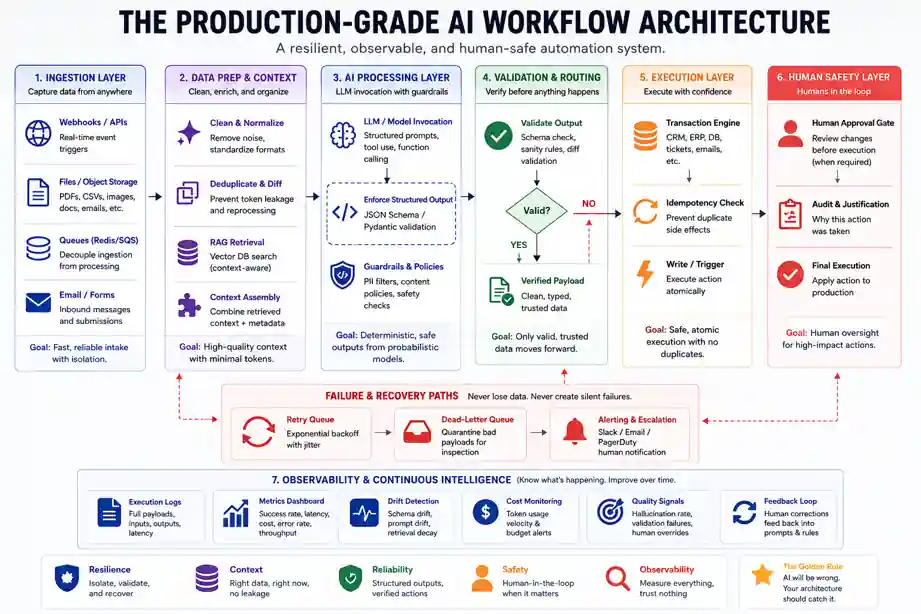
We’ve broken these down with a heavily asymmetrical focus. Specifically, the first three are complex architectural setups we’ve deployed; meanwhile, the remaining 12 are lean, specific operational templates.
Tier 1: The Core Infrastructure Buildouts
1. The Support Ticket Triage Engine
-
The Stack: Zendesk + n8n + GPT-4o-mini + Vector Storage.
-
The Metrics: 62ms average latency at the RAG tier; 4.1% baseline error rate.
-
How it works: A ticket hits the queue. Next, the workflow cleans up the HTML, runs a semantic search against your internal help documentation, tags customer sentiment, and drafts an internal note for your human support agents.
-
The Operational Scar: We spent six hours tracing a failed automation only to discover a vendor had renamed a field from
customer_phonetophone_numberin their system without updating their documentation. The LLM handled the change fine, but our strict downstream SQL database threw a fit and rejected the null value. -
Who should avoid it: Teams processing fewer than 500 tickets a week. Essentially, the setup debt simply isn’t worth it.
2. Unstructured PDF Invoice Processing
-
The Stack: AWS Textract + Anthropic API + NetSuite ERP.
-
The Metrics: 94.2% raw OCR extraction accuracy; ~$0.15 cost per invoice.
-
How it works: Invoices arrive via email. Then, Textract handles the raw spatial OCR. Finally, the raw text block goes to Claude, strictly instructed via system prompt to map the values into a rigid JSON schema containing
line_items,tax_id, andtotal_amount. -
The Operational Scar: Vendors format invoices in incredibly creative, terrible ways. For instance, if a vendor puts their phone number right next to the total balance, basic systems grab the phone number as the price. Therefore, you must implement a hard programmatic validation step: if
sum(line_items) != total_amount, the workflow must immediately flag the file and drop it into a human review queue.
3. Asynchronous Code Reviews
-
The Stack: GitHub Actions + Cursor/Claude Code CLI + Slack.
-
How it works: A developer opens a Pull Request. Afterward, a script pulls the git diff, checks it against your team’s specific internal style guide, and posts structural architectural feedback directly into the PR comments.
-
The Operational Scar: If a developer submits a massive 2,000-line change, the LLM loses context or runs out of tokens halfway through. Consequently, we learned you have to chunk files individually and analyze them file-by-file.
Tier 2: Internal Operations & Knowledge RAG
4. Slack Internal Knowledge Search
-
The Mechanics: Uses agentic data retrieval to query internal corporate drives when a team member pings a bot.
-
The Scar: Retrieval Decay. For example, if you have an old 2023 policy doc sitting in your drive alongside the new 2026 version, the vector database will occasionally pull the old chunk because it has a higher semantic similarity score to the user’s question. Thus, regular data pruning is non-negotiable.
5. Automated Meeting Notes & Action Items
-
The Mechanics: Raw Zoom transcripts are automatically chunked, passed to an LLM to extract actionable engineering tasks, and synced directly to Jira.
-
The Reality: If your transcript doesn’t have clear speaker names attached to lines, the AI will regularly attribute critical quotes to the wrong person.
6. Sentry Bug Ticket Enrichment
-
The Mechanics: A critical error triggers an alert. Subsequently, the workflow passes the stack trace to an AI model, searches your codebase for the offending line, and writes a detailed Jira ticket explaining the root cause.
7. Database Natural Language Interface
-
The Mechanics: Managers ask questions in plain English (“What was our top product in Chicago last month?”). Then, an MCP server interface translates the question to SQL, queries a read-only database replica, and sends back a chart.
Tier 3: Growth & Content Pipelines
8. SERP-Driven Content Briefs
-
The Mechanics: Enter a primary keyword. The automation triggers the Perplexity API to scrape current top-ranking layout structures, compares it against your existing domain architecture, and outputs a highly specific markdown brief for writers.
-
The Truth: You cannot automate the actual writing without it sounding like stale marketing copy, but automating the structural research saves hours per brief.
9. ICP Lead Scoring
-
The Mechanics: A new user signs up. Immediately, the automation scrapes their company website using Apify, reads the homepage to identify their core business model, and flags them in Salesforce if they match your ideal customer profile.
10. Video to Text Social Pipeline
-
The Mechanics: Drop an MP4 file into an S3 bucket. Next, Whisper transcribes the audio, and an LLM breaks the transcript down into three distinct short-form text layouts.
11. Competitor Price Monitoring
-
The Mechanics: A weekly cron job scrapes competitor pricing pages. Then, it runs an LLM diff-check to filter out layout changes, alerting your product marketing team via Slack only if actual numbers changed.
Tier 4: Edge Case & Specialized Tasks
12. Contract Redline Assistant
-
The Mechanics: Legal teams upload a standard vendor NDA. In response, the AI compares it to your corporate legal playbook, highlighting unusual liabilities or clauses in red text.
13. Customer Churn Risk Alerts
-
The Mechanics: Monitors application usage logs. Crucially, if an enterprise account’s activity drops by more than 25% month-over-month while they have open support tickets, it flags the account owner and drafts a recovery email.
14. Automated Product Localization
-
The Mechanics: When new copy strings are pushed to GitHub, an automation translates them into five languages while carefully preserving software variables and curly-bracket tags.
15. High-Volume Resume Parsing
-
The Mechanics: Incoming applicant PDFs are stripped of styling. Afterward, they are scanned to extract core technical skills, past employers, and years of experience directly into an Airtable database.
AI Workflow Architecture: Designing the Orchestration Layer
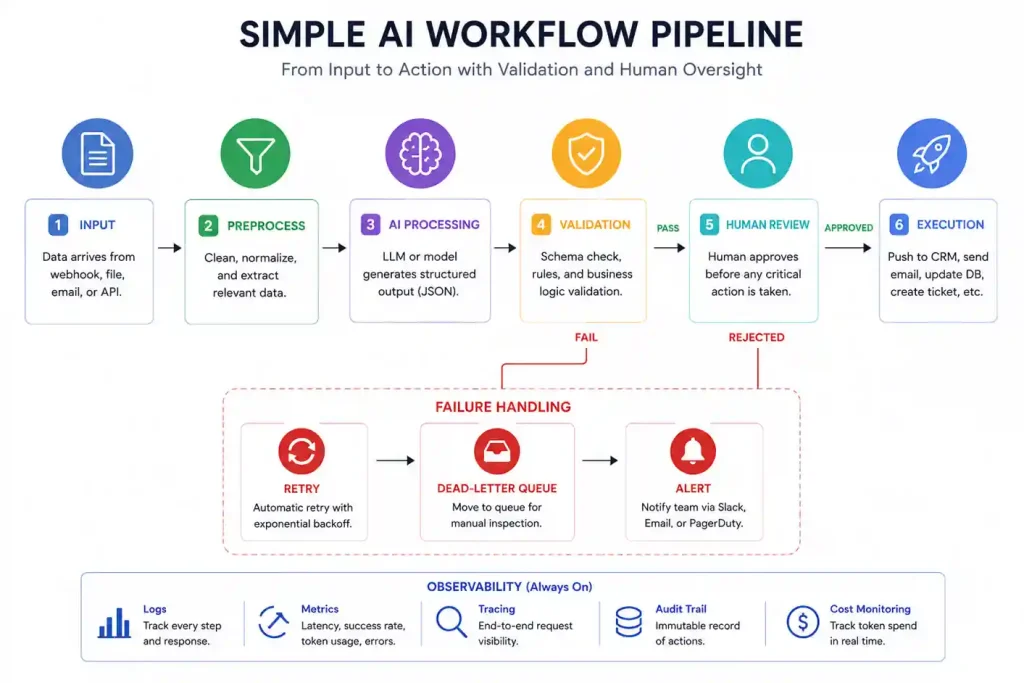
Deploying production-grade enterprise AI automation requires moving past independent API scripts and standardizing your AI Orchestration Layer. Specifically, the execution path must cleanly segregate your data extraction, semantic processing, and transaction execution engines.
Plaintext
                  [Incoming Unstructured Data]
                               │
                               ▼
                    ┌─────────────────────┐
                    │ Gateway Input Node  │
                    └──────────┬──────────┘
                               │
                               ▼
               ┌───────────────────────────────┐
               │    Structured Output Layer    │
               │  (Pydantic / Enforced Schema) │
               └───────────────┬───────────────┘
                               │
                     ┌─────────┴─────────┐
                     ▼                   ▼
               [Valid JSON]       [Malformed Schema]
                     │                   │
                     ▼                   ▼
         ┌──────────────────────┐  ┌─────────────────────┐
         │ Transaction Engine   │  │   Retry Queue /     │
         │ (CRM/ERP Integration)│  │ Exponential Backoff │
         └───────────┬──────────┘  └──────────┬──────────┘
                     │                        │
                     ▼                        ▼
         ┌──────────────────────┐  ┌─────────────────────┐
         │ Human Approval Gate  │◄─┤ Dead-Letter Queue   │
         └───────────┬──────────┘  └─────────────────────┘
                     │
                     ▼
         [Production State Change]
The Enterprise AI Automation Stack
To build according to this architecture blueprint, your production infrastructure setup should implement these distinct tiers:
-
Ingress & Decoupling: Webhook targets built via fast web-framework execution paths that instantly cache the execution payload inside a Redis queue. Crucially, never point heavy model execution pipelines directly to live webhooks.
-
The Context Isolation Layer: Programmatic validation steps that filter out data duplication before touching model tokens. For instance, if a string doesn’t pass a localized diff-check against recent records, it shouldn’t go to the LLM.
-
The Dead-Letter Queue Fallback: A dedicated routing condition within your orchestrator where runs that fail strict verification step criteria are securely parked. This prevents cascade processing drops.
Case Study: The $1,700 Weekend Glitch
Generally, most people think AI workflows fail because the model isn’t “smart” enough. In reality, they fail because the automation software is too dumb to know when to stop. Here is exactly what happens when you don’t build circuit breakers into your workflows.
Plaintext
[Blurry Invoice] ──► [AI Gets Confused]
                             │
                             ▼
[Infinite Loop]  ◄── [System Auto-Retries]
The Setup: Specifically, a logistics client built an automation to read 18,000 PDF invoices a month. The process was simple: a vendor emails an invoice, the AI reads the total amount, and the system logs that number into their accounting software.
The Root Cause: The workflow ran perfectly for two weeks. Then, on a Saturday night, a vendor emailed a corrupted, blurry scan. As a result, when the AI tried to read the PDF, it couldn’t find the price. Rather than returning a clean number, the AI returned an error message. Consequently, the downstream accounting software saw the text error, panicked, and rejected it.
The Catastrophe: Meanwhile, the automation platform saw the rejection and assumed there was just a temporary internet glitch. Its default setting was to automatically try again. Because of this, it sent the exact same blurry PDF back to the AI. First, it failed again. Next, it retried. Ultimately, the system repeated this cycle every 30 seconds for the entire weekend.
The Damage & The Fix:
-
Total Executions: The system tried to process one single bad file 14,200 times.
-
The Bill: The team woke up on Monday to a $1,764 charge for AI usage.
The fix had absolutely nothing to do with prompt engineering. We didn’t need a smarter AI. Instead, we needed basic plumbing. As a result, we rebuilt the workflow with a hard rule: If a file fails to process twice, stop immediately. Now, the system strips the file out of the queue, drops it into a manual review folder, and pings a human on Slack. Essentially, if you don’t tell your AI workflows exactly how to fail, they will fail as expensively as possible.
RAG Workflow Architecture & Retrieval Hygiene
Knowledge Unit:
Typically, RAG pipelines degrade because developers mistake raw text proximity for semantic truth. If your chunking strategy treats all text lines uniformly, your retrieval logic will mix out-of-date corporate context into live application dependencies.
Plaintext
[Raw Asset Ingestion] ──► [Recursive Text Splitter] ──► [Metadata Tagging Engine]
                                                                │
                                                                ▼
[Context-Aware Retrieval] ◄── [Reranking Pipeline] ◄── [Vector Index / Vector DB]
Consequently, when building a Retrieval-Augmented Generation layout for corporate workflows, you must account for Retrieval Decay. Over time, your vector indices become polluted with legacy artifacts. Therefore, the architecture must enforce strict structural guardrails:
-
Metadata Clustering: Every vector record must contain cryptographic timestamp markers, user-access scopes, and explicit expiration dates.
-
Reranking Pipelines: Never send the raw vector space output directly to the prompt. Instead, run your vector match candidates through a dedicated re-ranking engine to filter out semantic noise.
-
Context Consolidation: Set hard token allocation constraints. Otherwise, if your RAG workflow dumps raw context fragments into an open window, it drops your overall accuracy and spikes token costs.
AI Workflow Monitoring & Observability
Essentially, you cannot manage what you do not trace. Traditional application monitoring tools are completely blind to semantic failure states. For example, if your automation returns an HTTP 200 OK but outputs completely fabricated gibberish to a database, standard monitoring systems will report that everything is perfectly healthy.
Core Metrics to Monitor:
-
Schema Drift Latency: The calculation overhead added by validating outputs against defined types.
-
Hallucination Divergence Rate: Tracking model deviation variance across rolling system prompts over time.
-
Token Consumption Velocity: A real-time ledger recording token depletion speeds to catch runaway recursive processing states before they alter account billings.
Ultimately, by instrumenting dedicated logging pathways at every model invocation layer, you transform a fragile, black-box pipeline into a transparent, debuggable software utility.
Technical Architecture: Self-Hosted vs. Cloud No-Code
Ultimately, choosing between different automation platforms isn’t about looking at logos on a features page. It’s about deciding who is going to manage the system when a webhook drops a connection.
No-Code Cloud Platforms (Zapier / Make)
Naturally, if your team doesn’t have a dedicated developer, these are your entry points. Zapier is dead simple but punishingly expensive if you scale. Make handles complex branching paths infinitely better, yet the visual interface can quickly turn into a massive, unreadable spiderweb of icons if you try to build an enterprise-level data pipeline.
Code-First Orchestration (n8n)
Conversely, for high-volume operations or teams with strict data privacy requirements, we almost always recommend n8n. You can spin it up on your own infrastructure, meaning confidential corporate data never hits a third-party automation server. Most importantly, it lets you drop into raw JavaScript or Python inside any single step to handle data edge cases cleanly.
| Architecture Option | Best For | Structural Downside | Maintenance Overhead |
| Zapier (Cloud) | Basic linear automations | No custom retry logic control | Low |
| Make (Cloud) | Multi-path visual routing | Complex UIs get slow and buggy | Medium |
| n8n (Self-Hosted) | Production data, engineers | Requires DevOps infrastructure | High |
Cost Breakdown: The True Cost of Automation at Scale
To illustrate, let’s look at real numbers from an operational customer support pipeline processing exactly 10,000 incoming tickets per month.
Total Monthly Operational Cost = Platform Subscription + (Tokens Processed × Model Pricing) + Engineering Maintenance
-
Platform License (n8n Cloud): $50/month
-
LLM Tokens (GPT-4o-mini): 10,000 tickets × 2,500 tokens per ticket = 25,000,000 tokens total. At current API pricing, this comes out to roughly $7.50/month.
-
Engineering Maintenance Time: 3.7 hours per week × 4 weeks = 14.8 hours. At an internal engineering cost of $75/hour, this equals $1,110/month.
The blunt reality: The software license and the actual AI tokens are practically free. However, the true cost of running AI workflows is the human engineering time spent updating prompts, tracking down silent API failures, and re-writing code blocks when a vendor updates their data schema.
How to Build Your First Production Workflow
Importantly, if you are just starting out, do not try to build a fully autonomous AI assistant that answers your emails. Instead, start with a non-destructive task where the AI reads data rather than writing it.
-
Isolate an extraction task: Find an operation where a human is wasting an hour a day opening a file, copying three numbers, and pasting them into a spreadsheet.
-
Lock down the output structure: Do not let the model talk freely. Rather, mandate a strict JSON structure. If the model outputs conversational text instead of raw data keys, design your workflow to reject the run immediately.
-
Build a Slack/Email Alert Node: Create an explicit error path. Specifically, if an API request fails or a model returns an unexpected format, pass that exact payload to a Slack channel so a human can inspect it right away.
Summary: The Systems Engineering Threshold
Ultimately, the hard part of AI automation was never the model. Instead, the real challenge is building systems resilient enough to survive it.
In practice, AI workflows behave less like traditional deterministic software and more like unpredictable operational organisms. They drift, decay, mutate, and quietly fail in ways dashboards rarely capture. Therefore, the teams succeeding in 2026 are not the ones writing the cleverest prompts. Rather, they are the ones building the strongest operational scaffolding around inherently unstable systems. The LLM is just a highly specialized gear inside your engine; the architecture you assemble around it is your real product.